Hide/Delete Fields

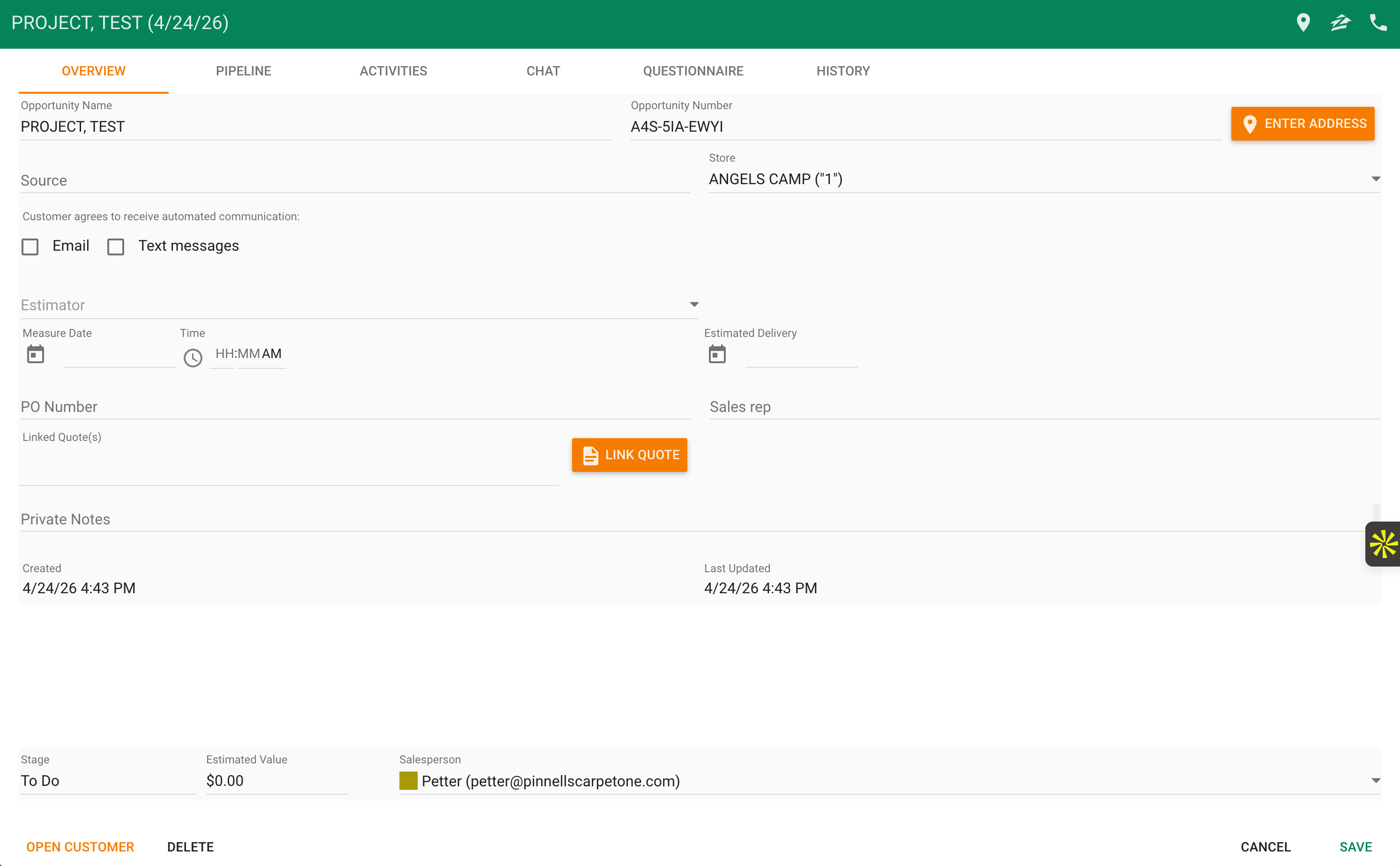
There are certain fields in CRM Opportunities that I would like the option to hide (to minimize noise and streamline my team's work better). The way that the "Measure" option on the Opportunity Overview page functions is highly confusing, since it doesn't create a Measure Mobile file, nor does it move the opportunity to "Measure" in the pipeline.
Similarly, we somehow have two fields for sales reps. One that's just a text field, and the dropdown (which should be used).
Mistakes happen on my team because of these fields, and it would be very easy to solve this going forward by allowing them to be hidden.
PS. What makes it even more confusing is that the free-form text field that we have does not have the same label as other RFMS CRM users where the label is completely different. For example, one member has it labeled as "WO / SL #".
Comments
I completely agree that the schedule a measure function on the opportunity page is redundant. When training my sale's staff I have to stress "only click on the orange buttons" to schedule, link, or write a note...
Could you elaborate on the "two fields for sales reps."? Is this on the Pipeline tab or somewhere in the opportunity itself?
That last part is intriguing. Could you take a screenshot and upload it here? I haven't ran into this one yet. However, a common solution I've heard for these is that there is a "memory" or "data" leak after so long of having the app. The solution could simply be deleting the app and reinstalling the app. My team does this every 6 months or so now to prevent lack of syncing.
Keigen Krueger Sure! I should have been clearer: Everyone on my team sees the same fields, but other CRM instances (see screenshot 2) have a different input name/placeholders for the same field. I redacted their name.
I realize that I'm using the browser version and they're using the app, but our instance looks the same no matter the device or browser/app. Additionally, I have reviewed this with Cyncly staff and their Overview also looks different.
My instance:

Other CRM instance:
Very interesting. Mine looks completely different than either of those. Your "WO or SL #" or "sales rep" looks like my "Job Number."
What is the link for the online browser version of CRM? I would like to compare mine to yours, I haven't logged into the browser version in over a year.
Pieter Pavel I did not tag you on my above reply.
Further, I looked at 5 other CRM users on their tablets and they all show the same UX as my screenshot above. I would heavily recommend reinstalling all mobile apps for good hygiene.
Keigen Krueger
You got it: https://crm.rfms.online
It's almost like we all defined that field as a custom field with RFMS/Cyncly at some point in time? Why would I need a second "Sales Rep" field that doesn't even tie back to RFMS (which the dropdown with colors does for me)?
Do you use your "Job Number" field?
And to be on the safe side, here's our version #
My @ isn’t working unfortunately.
That would be an interesting concept. If so it would have had to been set up on the backend as I know of no option to change that in app or on the ROS Portal.
I completely agree there is no need for your “sales rep” line there above the true assigned sales rep button with the colors. (Side note it would be fun to assign colors to sales people as some are so close to each other)
We never used the job number function. Seems almost redundant as we wouldn’t get to the phase of having a job number until a Quote at the very least was created. By then we have an attached link the leads to that info as well as an order if it gets exported.
Looks like you need a version! There was an update at the beginning of this month for all RFMS mobile apps.
I just left the office and switched to mobile to reply to this so I cannot attach a picture but my version says 1.4.1.
I logged into the web browser from my tablet and it looks exactly the same as my mobile app.
Keigen Krueger
Exactly. I'm not sure who actually knows about this mystery field?
Haha, yes, agreed on the colors. We have like 3 purples.
Yes! My iOS device is on 1.4.1 but browser is still 1.4.0 despite logging out and in and hard refresh 🤷♂️
I wonder how many different ones are out there, haha. When did you get CRM? We got our first license in winter of 2023.
Unfortunately I have one of the many purples 😂
I looked at my browser version and it is 1.4.0. So we are in the same boat there, though it adds more to the mystery.
I cannot tag Carlos Banuelos from my mobile device, though if you can I would heavily recommend you do.
Keigen Krueger CC: Carlos Banuelos
I'm not entirely sure, but I started in October 2025, and we already had licenses going back before then. I implemented it this year, and even at convention, Cyncly reps were confused about our custom field. However, when I brought this to their attention this week, I was asked to post here...
😂 At least you're not 💩 like me.
I have more tickets to come, but simplicity and clarity affecting my team's workflow are the most important to me.
I was at convention too. I believe we may have met? You’re a Carpet One member.
Interesting they asked you to post here. This forum doesn’t get much traction.
Ah it’s all the luck of the draw 😂
If you have any questions about the mobile apps let me know! I’ll send you an email, it’s on members net. I’d love to share.
Keigen Krueger Well, I think that may have been why they asked me to post here...
Hi Petter Fritz! Thanks for the tag -- This field is a custom labeled field from RFMS Order Entry. Please see my screenshots below for more info. Changing the system option, then "syncing your settings" in ROS and then logging out/in from RFMS CRM will fix it. **Please be patient, it can take a few minutes to propagate the changes sometimes. Thanks!
Thanks, Carlos Banuelos! But is not possible to hide it (and other fields) in CRM?
Please sign in to leave a comment.